Turn MySQL CREATE TABLE SQL into an ERD
Use your existing MySQL CREATE TABLE definitions to inspect table relationships. Follow this customers-and-orders example from SQL import to foreign-key review and PNG export. You do not need to give the website database credentials, and you can open the example without signing up.
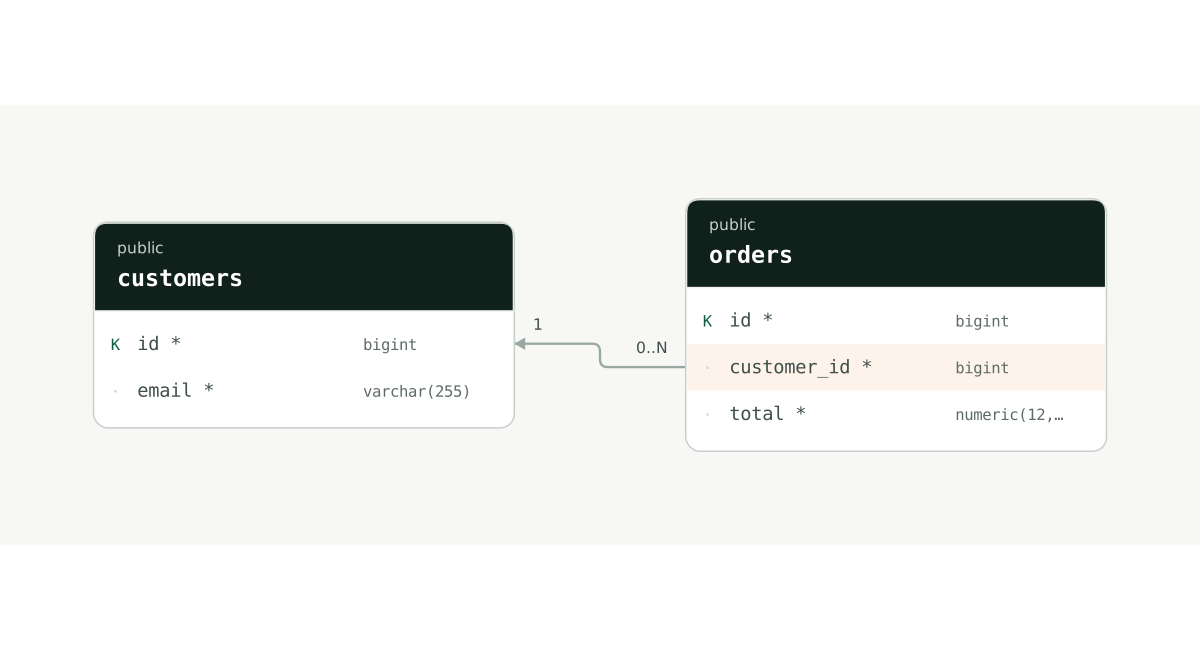
K marks a primary key; * marks a required column. On small screens, scroll the diagram horizontally or select it to view at full size.
From import to a diagram you can keep
1. Prepare table definitions
Start with the example below or obtain CREATE TABLE definitions for the related tables from your SQL client. Include the referenced tables. INSERT statements and full data dumps are unnecessary.
2. Validate MySQL DDL
In the editor, choose Import → MySQL DDL, paste the SQL, and select Validate MySQL DDL. Review the table list and warnings, select the tables, and choose Import 2 tables to open a new document. Input is limited to 2MiB and a document to 100 tables.
3. Review and keep the diagram
Check the link from orders.customer_id to customers.id and the bigint type on both columns. After editing, keep a JSON backup or export a PNG. Sign in to save the document to the cloud.
A SQL example you can import
Paste this SQL into the MySQL DDL tab. Expect two tables and one foreign key. The example does not declare AUTO_INCREMENT, so row identifiers must be supplied separately.
CREATE TABLE customers (
  id bigint NOT NULL,
  email varchar(255) NOT NULL,
  PRIMARY KEY (id),
  UNIQUE (email)
);

CREATE TABLE orders (
  id bigint NOT NULL,
  customer_id bigint NOT NULL,
  total decimal(12,2) NOT NULL,
  PRIMARY KEY (id),
  FOREIGN KEY (customer_id) REFERENCES customers (id)
);
View the same structure as DBML
Table customers {
  id bigint [pk]
  email varchar(255) [not null, unique]
}

Table orders {
  id bigint [pk]
  customer_id bigint [not null]
  total decimal(12,2) [not null]
}

Ref: orders.customer_id > customers.id
The button opens a new document made from this code. Edit without signing up; your existing work is kept. To practice importing it yourself, copy the code and paste it into Import in the editor.
Start with this example →Check foreign-key types and indexes
MySQL foreign-key and referenced columns need compatible types. Match integer size and signedness; check character sets and collations for string keys. Review the index and storage-engine requirements against the actual MySQL table definitions.
Separate generated IDs from business uniqueness
ID generation and business uniqueness, such as unique email addresses, are separate decisions. Model primary keys and unique constraints first, then compare execution details such as AUTO_INCREMENT with the real schema. The example declares primary keys without assuming automatic ID generation.
Document an existing MySQL schema
MySQL input is converted into a PostgreSQL document model. Review warnings for definitions that are not preserved exactly, such as UNSIGNED, engine, character-set and collation options, and retain the source. This does not clone a server with its triggers, procedures and views. Diagram edits do not update the database; SQL export is currently disabled.
When a relationship is missing
A column named customer_id does not create a foreign key by itself. Check for a FOREIGN KEY declaration and make sure the referenced table was imported. Review warnings for unsupported definitions. If the database has no FK for a business relationship, use an explanatory relationship in the editor.
Try it: add an order description
Open the example and add a nullable text column named memo to orders. Confirm that the customer_id relationship remains, then download a PNG. Keep the original SQL alongside a JSON backup to compare the source and imported model.
Open the example and practice →What you can use for free today
Free currently supports DBML and Schema Studio JSON import and export, plus table and relationship editing. Sign in to save to the cloud and back up important work as JSON. Supported PostgreSQL/MySQL DDL imports, the PostgreSQL metadata query and PNG export are also free. SQL/SVG exports are coming soon. MySQL input is converted to the PostgreSQL document model; review warnings against the original.
See plans and storage limits →MySQL 8.4 — FOREIGN KEY constraints ↗