Visualize a PostgreSQL schema as an ERD
Document PostgreSQL relationships by importing CREATE TABLE SQL or collecting metadata from an existing database with the provided query. This public.projects and public.tasks example explains both paths and what to review. Schema Studio does not connect directly to your database, and you can edit the example without signing up.
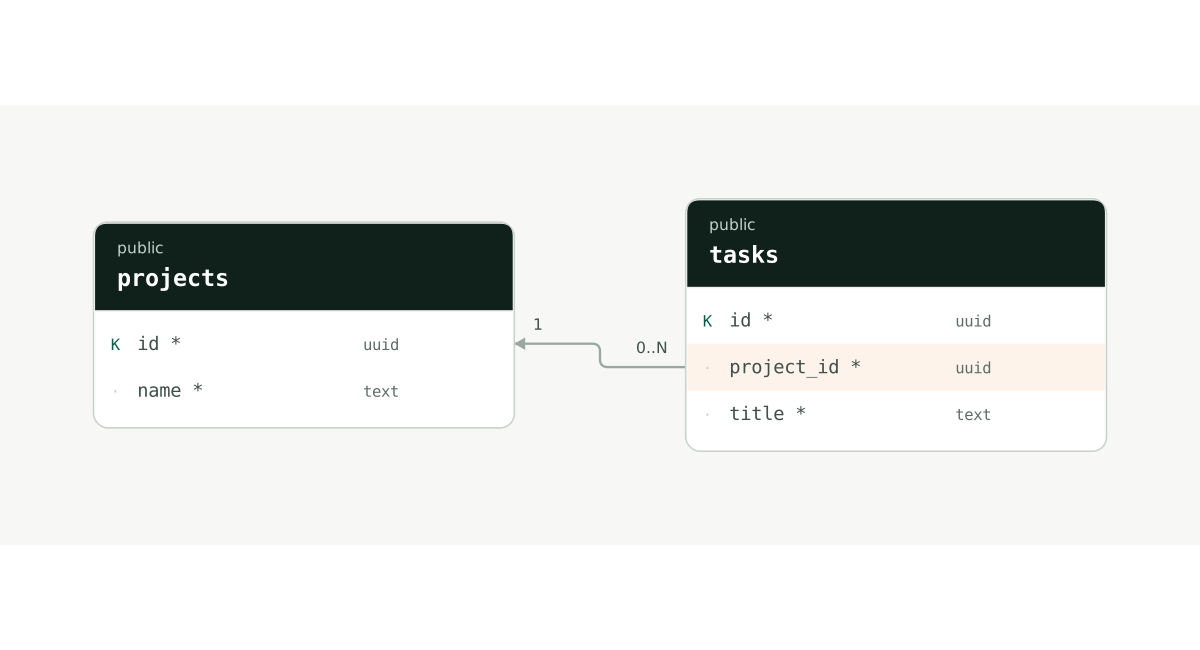
K marks a primary key; * marks a required column. On small screens, scroll the diagram horizontally or select it to view at full size.
From import to a diagram you can keep
1. Start with SQL
Copy the SQL below into Editor → Import → PostgreSQL DDL. Select Validate DDL to review tables and warnings. For your own schema, include referenced tables and the relevant constraint definitions.
2. Import selected tables as a new document
Select both projects and tasks, then choose Import 2 tables to open a new document. Input is limited to 2MiB and a document to 100 tables. Compare the table count and foreign keys with your source, and investigate warnings before relying on the result.
3. Review relationships and keep the result
Check tasks.project_id → projects.id, column nullability and data types. Export a PNG for a picture to share and JSON to back up layout and descriptions. Cloud saving is available after signing in.
A SQL example you can import
Paste this SQL into the PostgreSQL DDL tab to import two tables and one foreign key. UUID generation defaults are omitted, so inserted records would need supplied UUIDs. You can import the diagram without executing the SQL in a database.
CREATE TABLE public.projects (
  id uuid PRIMARY KEY,
  name text NOT NULL
);

CREATE TABLE public.tasks (
  id uuid PRIMARY KEY,
  project_id uuid NOT NULL,
  title text NOT NULL,
  FOREIGN KEY (project_id) REFERENCES public.projects (id)
);
View the same structure as DBML
Table public.projects {
  id uuid [pk]
  name text [not null]
}

Table public.tasks {
  id uuid [pk]
  project_id uuid [not null]
  title text [not null]
}

Ref: public.tasks.project_id > public.projects.id
The button opens a new document made from this code. Edit without signing up; your existing work is kept. To practice importing it yourself, copy the code and paste it into Import in the editor.
Start with this example →For an existing database: collect metadata
In Editor → Import → PostgreSQL metadata query, copy the query. Run it in your SQL client, copy the schema_studio JSON result, paste it into the JSON import tab, and choose Validate JSON. The query targets PostgreSQL 16/17 and collects structure for non-system tables you can SELECT. It does not read records or change the database; review the table selection because names and descriptions can still be sensitive.
Check schema-qualified references
public.projects and projects in another schema are separate tables. In a multi-schema database, verify that each relationship reaches the intended target. Display names and descriptions help a team relate technical identifiers to its own terminology.
Review primary keys, uniqueness and nullability
A PostgreSQL primary key identifies a row uniquely and cannot contain NULL. A foreign key must reference an eligible key, such as a primary or unique key. Check NOT NULL on the referencing columns to understand whether the relationship is required. For composite keys, review column order and correspondence together.
Check what the diagram represents
An ERD helps review tables and relationships. It is not a deployment tool that reproduces every index option, permission, RLS policy or function. Free imports DBML, Schema Studio JSON and supported PostgreSQL DDL, and includes a PostgreSQL 16/17 metadata query. Review and test separate SQL before applying a design to a real database.
When tables have no relationship line
A name such as project_id does not imply a foreign key. Check the FOREIGN KEY definition, inclusion of the referenced table and its schema name. Views, RLS policies, functions and specialized indexes are not fully represented, so compare warnings and the source SQL.
Try it: make the project relationship optional
Open the example and allow NULL on tasks.project_id. The foreign key remains, but the model can now represent a task without an assigned project. Compare the relationship’s optionality before and after, then back up the diagram as JSON.
Open the example and practice →What you can use for free today
Free currently supports DBML and Schema Studio JSON import and export, plus table and relationship editing. Sign in to save to the cloud and back up important work as JSON. Supported PostgreSQL/MySQL DDL imports, the PostgreSQL metadata query and PNG export are also free. SQL/SVG exports are coming soon. MySQL input is converted to the PostgreSQL document model; review warnings against the original.
See plans and storage limits →