Design a database schema with an ERD diagram
An entity relationship diagram (ERD) describes entities and their relationships. A physical database diagram shows tables, columns, primary keys and foreign keys so you can review a relational schema. Schema Studio lets you edit that structure and explain design decisions in your browser.
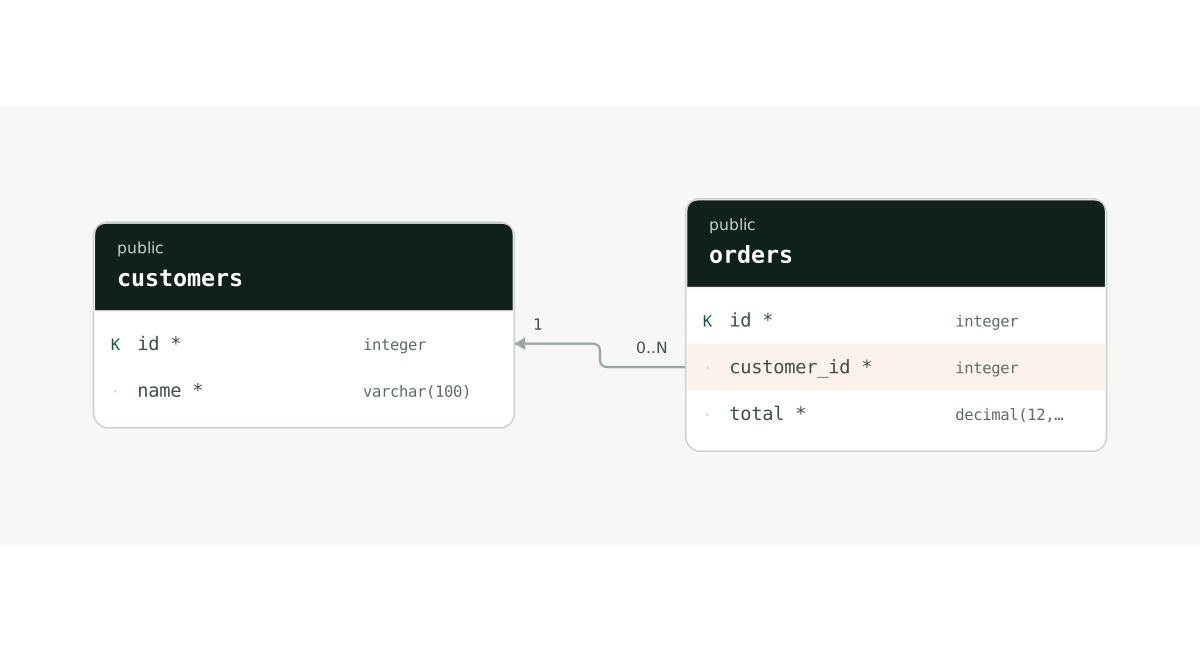
K marks a primary key; * marks a required column. On small screens, scroll the diagram horizontally or select it to view at full size.
A DBML example you can import
One customer can place several orders. The DBML below represents the many-to-one relationship from orders.customer_id to customers.id. Orders link to a customer identifier instead of repeating the customer’s name.
Table customers {
  id integer [pk]
  name varchar(100) [not null]
}

Table orders {
  id integer [pk]
  customer_id integer [not null]
  total decimal(12,2) [not null]
}

Ref: orders.customer_id > customers.id
The button opens a new document made from this code. Edit without signing up; your existing work is kept. To practice importing it yourself, copy the code and paste it into Import in the editor.
Start with this example →How to read the diagram
Start with what customers and orders store, then identify each row through its id primary key. Follow customer_id to the referenced table and column. Its NOT NULL constraint requires a customer identifier for each order. Review nullability alongside the relationship line.
Model many-to-many relationships with a junction table
If a product can appear in many orders and each order contains many products, introduce a junction table such as order_items. Reference both sides with order_id and product_id, and store information such as quantity on that relationship. Decide whether repeated product lines are allowed before choosing a uniqueness constraint.
Distinguish a logical model from database constraints
A business relationship may exist without a database foreign key. Distinguish explanatory relationships from foreign-key relationships in Schema Studio. Editing a diagram does not automatically change a production database; review and test a separate migration before applying a schema change.
What you can use for free today
Free currently supports DBML and Schema Studio JSON import and export, plus table and relationship editing. Sign in to save to the cloud and back up important work as JSON. Supported PostgreSQL/MySQL DDL imports, the PostgreSQL metadata query and PNG export are also free. SQL/SVG exports are coming soon. MySQL input is converted to the PostgreSQL document model; review warnings against the original.
See plans and storage limits →